
VoIP vs Landline: Real Cost Comparison for Small Business
Running a 10-person office in Tampa Bay? Here's the honest cost breakdown of VoIP vs traditional landlines — including what the phone companies don't tell you.
If you’re running a small business in Plant City, Brandon, or anywhere in the Tampa Bay area, you’ve probably had at least one painful conversation with your phone company. Maybe your bill crept up $30 a month and you’re not sure why. Maybe you added two employees and found out adding lines is somehow a $200-per-line ordeal. Maybe you just accepted the pain because “that’s how phone systems work.”
Here’s the thing: it doesn’t have to be that way. VoIP (Voice over Internet Protocol) has been around long enough to be genuinely mature technology, and for most small businesses it’s a no-brainer switch. But there’s also a real conversation to have about when traditional landlines still make sense — and I’d rather give you the honest picture than just tell you what sounds good.
Let me walk you through what I’d actually recommend to a 10-person office right now.
What You’re Actually Paying For With a Landline
Traditional landlines run on the PSTN — the Public Switched Telephone Network — which is the same copper-wire infrastructure that’s been around since the 1800s. Your phone company maintains it, charges you monthly line fees, and adds on a buffet of “features” that should arguably be included.
For a 10-person office, here’s what a typical landline bill looks like:
- Monthly line fees: $30–$50 per line × 10 lines = $300–$500/month
- Long-distance and interstate calls: Often billed separately, especially on older plans
- Basic features: Voicemail, call forwarding, caller ID — sometimes bundled, sometimes not
- Hardware: PBX (Private Branch Exchange) equipment to route internal calls, which can cost $3,000–$10,000 upfront and requires periodic maintenance
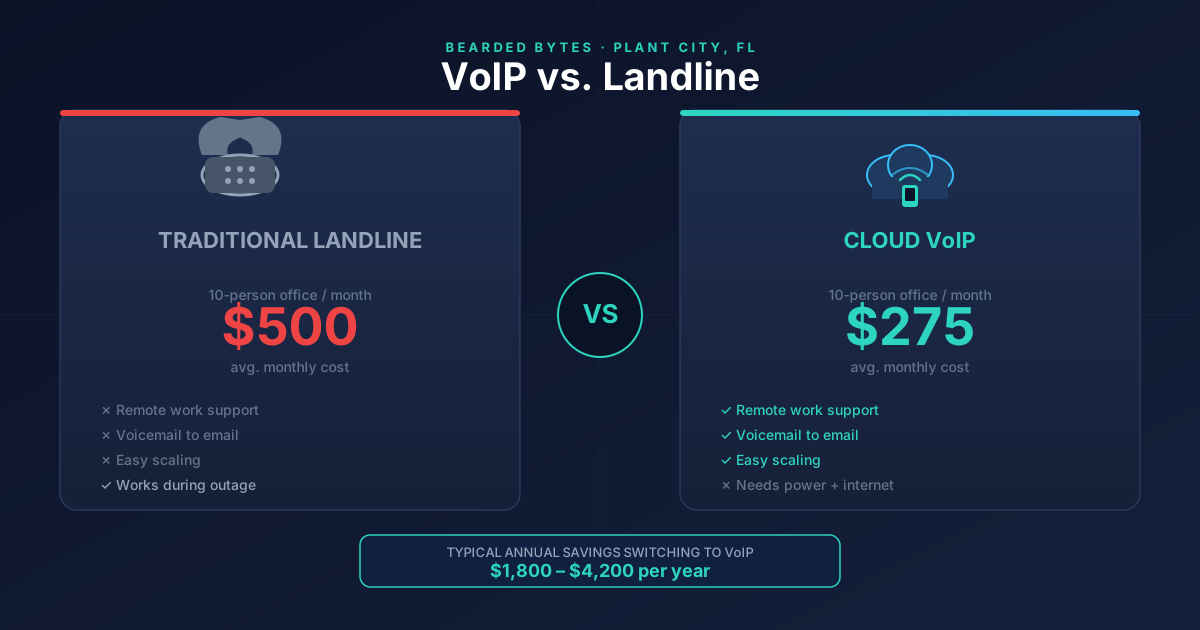
Add it up and you’re typically looking at $400–$700/month for a 10-person team, before you even think about hardware or tech support. And if someone works from home? Good luck extending that system without a serious infrastructure project.
What VoIP Actually Costs
VoIP sends voice calls over your internet connection instead of copper wires. That shift changes the economics completely.
Here’s what a modern VoIP setup looks like for a 10-person Florida business:
- Monthly service: $20–$35 per user × 10 users = $200–$350/month
- Features included: Voicemail-to-email, call recording, auto-attendant, hold music, conferencing, mobile apps — all standard
- Hardware: IP phones run $80–$200 each, or your staff can use softphones (apps on their computers or smartphones) for free
- Long distance: Typically included in the monthly rate
Total monthly cost: $200–$350/month, with most features that landlines would charge extra for already baked in.
The math is pretty clear. Even before you factor in hardware, you’re saving $150–$350/month. Over a year, that’s $1,800–$4,200 back in your pocket — which for a small business in Hillsborough County is real money.
The Features Gap Is Getting Embarrassing for Landlines
I’ve been setting up and maintaining business phone systems in the Plant City area for years, and the features comparison between VoIP and traditional landlines isn’t even close anymore. Here’s what you get with a modern VoIP platform that a traditional landline simply can’t match without expensive add-ons:
Remote and hybrid work. Your employees can use the same business number from anywhere — home, a job site, a coffee shop in Lakeland. The call rings on their laptop or phone. Customers never know the difference. With a landline, this is either impossible or requires a complicated (and expensive) call-forwarding setup.
Voicemail to email. Every voicemail gets transcribed and sent to your inbox. I can’t tell you how many clients have told me this single feature changed how they run their day.
Auto-attendant. “Press 1 for sales, press 2 for support…” — with VoIP, you set this up in a web browser in about 15 minutes. With a traditional PBX, you’re calling a technician.
Call analytics. See how many calls came in today, how long they waited, which lines are busy. This data is gold for staffing decisions.
Easy scaling. Adding a user takes about two minutes in a web portal and costs whatever your per-seat fee is. No technician visit, no new hardware order, no waiting.
When Landlines Still Make Sense
I’m not going to pretend VoIP is perfect for every situation. Here’s where traditional landlines still have a legitimate edge:
Alarm systems and old fax machines. A lot of security alarm panels and older fax machines were built to work with analog phone lines. They can be finicky on VoIP. If you have either of these, you’ll want to keep at least one analog line — or budget for updated hardware.
Power outages. Landlines work during a power outage (the line carries its own power). VoIP needs electricity and internet — so if the power goes out for an extended period, like during one of our Florida hurricane seasons, your phones go down unless you have a backup generator or UPS. This is something I specifically discuss with every client here in Central Florida, because summer storms are real.
Extremely poor internet quality. VoIP needs a reliable, reasonably fast connection. If your office internet is already struggling, adding voice traffic will expose that. The fix is usually upgrading your internet — which often still saves you money net-net — but it’s a real consideration.
For most businesses I work with, the right answer is VoIP for the main phone system plus one analog line kept for the alarm or fax, if needed.
The Hidden Costs Nobody Talks About
There are a few things on both sides that don’t show up in the headline price:
VoIP hidden costs:
- You’ll need a decent business-class internet connection. Consumer-grade cable internet can work, but I’d recommend at least a 50 Mbps connection with QoS (Quality of Service) configured on your router to prioritize voice traffic.
- If you want physical desk phones (some clients prefer them, especially reception desks), budget $100–$200 per phone.
- Some VoIP platforms nickel-and-dime you on toll-free numbers, international calls, or call recording storage.
Landline hidden costs:
- When your PBX hardware fails — and it will eventually — you’re looking at repair or replacement costs that can run thousands of dollars.
- Adding or removing lines usually requires a technician visit and a service fee.
- You’re locked into a contract with your telco. Switching providers isn’t as simple as canceling a SaaS subscription.
What I Actually Recommend
For a 10-person office in the Tampa Bay area today, I’d go with a cloud VoIP platform like RingCentral, Nextiva, or Zoom Phone — all of which I’ve deployed for local clients — and use softphone apps for most users. If reception or a front desk needs a physical phone, we’ll add two or three IP desk phones. Keep one analog line if there’s a fax machine or alarm system that needs it.
Setup takes about a day. Monthly costs drop immediately. And when the next team member comes on board, onboarding their phone takes five minutes instead of a service call.
I’ve walked through this exact conversation with businesses in Plant City, Lakeland, and Brandon, and almost every time the question isn’t “should we switch” — it’s “why didn’t we do this sooner?”
Ready to Stop Overpaying for Phones?
If you’re currently on a traditional landline system and want to see what switching would actually look like — specific cost comparison, hardware recommendations, migration plan — I’m happy to take a look at your current setup at no charge.
Schedule a free consultation and I’ll put together a side-by-side comparison for your office specifically. No sales pitch, just the real numbers.
You can also check out what a fully managed IT setup looks like if you want someone handling not just your phones but your whole tech stack at our managed IT services page.
Tags: #voip#small business#phone systems#florida#cost savings
Need help with this in your business?
Bearded Bytes provides on-site IT support, cybersecurity, and managed services across Plant City and the Tampa Bay area. Book a free consultation.
Talk to Brendan →